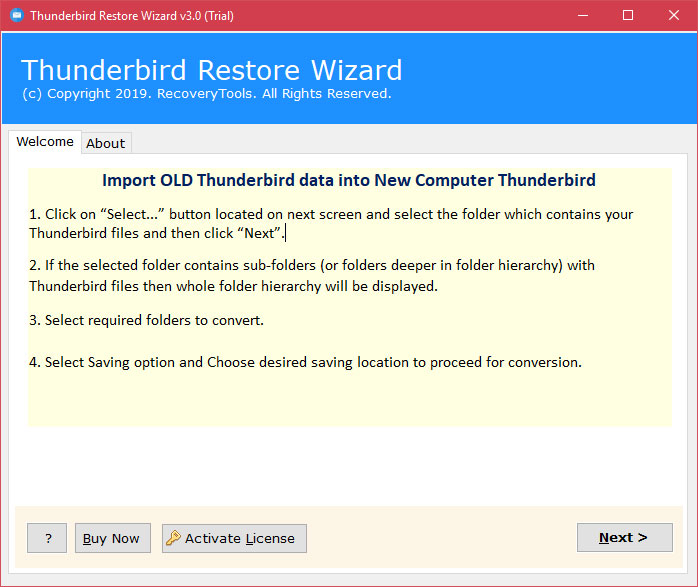
RecoveryTools Thunderbird Restore Wizard
Category
Sub-Category
Completed orders
Price
Delivery Cost
Minimum Order
Location
RecoveryTools Thunderbird Restore Tool – Complete Overview
Introduction
RecoveryTools Thunderbird Restore Tool is a professional Windows-based utility designed to restore, recover, and transfer Mozilla Thunderbird profiles and mailbox data with complete accuracy. The software enables users to restore Thunderbird emails, contacts, calendars, attachments, address books, local folders, and profile settings to a new computer or Thunderbird installation without data loss.
Whether you are upgrading to a new system, recovering from profile corruption, restoring a backup, or migrating Thunderbird data between devices, the Thunderbird Restore Tool provides a simple and reliable solution. The software preserves the original folder hierarchy, email properties, attachments, and account structure throughout the restoration process.
What is Thunderbird Restore Tool?
Thunderbird Restore Tool is a dedicated restoration and migration solution that helps users recover and restore Thunderbird mailbox data from existing Thunderbird profiles, backup files, or local Thunderbird storage folders.
The software can restore:
Emails
Attachments
Contacts
Address Books
Calendars
Local Folders
Account Profiles
Mailbox Structure
Meta Properties
The tool supports restoring data to a new computer, a new Thunderbird profile, or another Thunderbird installation while maintaining complete data integrity.
What Does the Tool Do?
The RecoveryTools Thunderbird Restore Tool performs several important functions:
Restore Thunderbird Profiles
Restores complete Thunderbird profiles, including emails, contacts, calendars, settings, and attachments.
Restore Emails with Attachments
Transfers Thunderbird emails while preserving attachments, formatting, sender details, recipients, timestamps, and other email properties.
Recover Corrupted or Inaccessible Data
Helps restore mailbox data from damaged, inaccessible, or improperly configured Thunderbird profiles.
Migrate to a New Computer
Allows users to move Thunderbird data from an old computer to a new system without manually copying files.
Restore Multiple Profiles
Supports restoring multiple Thunderbird profiles simultaneously.
Preserve Folder Structure
Maintains original folders, subfolders, and mailbox hierarchy during the restoration process.
Restore Contacts and Calendars
Recovers contact information and calendar entries separately or together based on user requirements.
Who Is This Tool For?
The Thunderbird Restore Tool is ideal for:
Home Users
Individuals who need to restore Thunderbird after a system crash, reinstallation, or computer replacement.
Business Users
Organizations that need to migrate Thunderbird accounts across multiple workstations.
IT Administrators
Professionals responsible for restoring employee email profiles and maintaining email continuity.
Data Recovery Specialists
Experts who require a reliable solution for recovering Thunderbird mailbox data.
Educational Institutions
Schools and universities managing Thunderbird-based communication systems.
Government Organizations
Departments that require secure restoration of Thunderbird data archives.
Key Features of Thunderbird Restore Tool
Complete Thunderbird Data Restoration
Restore all Thunderbird mailbox components including emails, contacts, calendars, attachments, and local folders.
Restore Unlimited Data
No restrictions on mailbox size when restoring Thunderbird data.
Multiple Data Loading Options
Load Thunderbird data using configured profiles or manually select Thunderbird mailbox files and folders.
Restore Multiple Profiles
Restore one or more Thunderbird profiles in a single operation.
Separate Restoration Options
Restore emails, contacts, and calendars independently.
Attachment Preservation
Maintains all email attachments during restoration.
Maintains Data Integrity
Preserves the original mailbox structure and folder hierarchy.
Standalone Utility
No additional software installation is required.
Custom Destination Selection
Allows users to choose the desired restoration location.
Windows Compatibility
Supports all modern Windows operating systems, including Windows 11.
Fast Processing Engine
Quickly restores large Thunderbird profiles without performance issues.
User-Friendly Interface
Designed for both technical and non-technical users.
Common Use Cases
Upgrade to a New Computer
Transfer Thunderbird data from an old PC to a new one.
Recover Corrupted Profiles
Restore inaccessible or damaged Thunderbird mailbox data.
Restore Backup Data
Recover Thunderbird profiles from previously saved backups.
System Migration
Move Thunderbird data during operating system upgrades.
Account Recovery
Restore accidentally deleted Thunderbird accounts and mailbox information.
Corporate Data Migration
Migrate multiple employee Thunderbird profiles efficiently.
Disaster Recovery
Recover critical email data after hardware failure or system crashes.
How to Use Thunderbird Restore Tool
Step 1: Download and Install
Download the Thunderbird Restore Tool and install it on your Windows computer.
Step 2: Launch the Software
Open the application after installation.
Step 3: Load Thunderbird Data
Choose one of the available loading methods:
Select Files
Select Folders
Load Configured Thunderbird Profile
Step 4: Preview Data
Review the uploaded Thunderbird data before restoration.
Step 5: Select Destination
Choose Thunderbird as the destination and specify the target profile location.
Step 6: Start Restoration
Click the Restore or Next button to begin the restoration process.
Step 7: Access Restored Data
Open Thunderbird and verify the restored emails, contacts, calendars, and folders.
Benefits of Using Thunderbird Restore Tool
Saves time during migration and recovery.
Eliminates manual profile restoration.
Prevents data loss.
Preserves mailbox structure.
Supports large Thunderbird databases.
Handles multiple profiles simultaneously.
Requires minimal technical expertise.
Provides reliable and accurate restoration results.
Supports business and personal restoration needs.
System Requirements
Operating System
Windows 11
Windows 10
Windows 8.1
Windows 8
Windows 7
Hardware Requirements
Minimum 4 GB RAM
100 MB Free Disk Space
Intel Pentium 2.4 GHz Processor or higher
Software Requirements
Thunderbird installation (optional)
Administrator privileges recommended
Free Trial Version
The software provides a free demo edition that allows users to evaluate the functionality before purchasing.
Demo Limitations
Restores up to 25 items from each folder.
Suitable for testing software performance and output quality before upgrading to the licensed edition.
Frequently Asked Questions (FAQs)
Can I restore Thunderbird data to a new computer?
Yes. The tool is specifically designed to restore Thunderbird profiles and mailbox data to another computer.
Does the tool restore email attachments?
Yes. All attachments are restored along with emails while maintaining their original format and structure.
Can I restore contacts and calendars separately?
Yes. The software offers separate restoration options for contacts and calendars.
Does the software support multiple Thunderbird profiles?
Yes. Multiple Thunderbird profiles can be restored simultaneously.
Will folder hierarchy be preserved?
Yes. The software maintains the original folder and subfolder structure throughout the restoration process.
Is there any mailbox size limitation?
The licensed version supports restoring large Thunderbird mailboxes without restrictions.
Is technical expertise required?
No. The software features a user-friendly interface suitable for both beginners and professionals.
Does it support Windows 11?
Yes. The software is fully compatible with Windows 11 and previous Windows versions.
Conclusion
RecoveryTools Thunderbird Restore Tool is a comprehensive solution for restoring, recovering, and migrating Thunderbird mailbox data. It enables users to restore complete Thunderbird profiles, including emails, contacts, calendars, attachments, and local folders, while preserving folder hierarchy and data integrity. With support for multiple profiles, unlimited restoration capabilities, and an easy-to-use interface, the software serves as an ideal choice for individuals, businesses, IT administrators, and data recovery professionals seeking a dependable Thunderbird restoration solution.
 Company Rating